

Rufus bietet ja schon seit einigen Versionen die Funktion an, Windows 11 lokal zu installieren und mehr. In Rufus 4.14 geht es noch weiter. Denn jetzt kann man „erzwungene Störfaktoren“, wie Teams, Outlook, Copilot und weitere Apps entfernen. [Update]: Jetzt als finale Version ohne weitere Änderungen
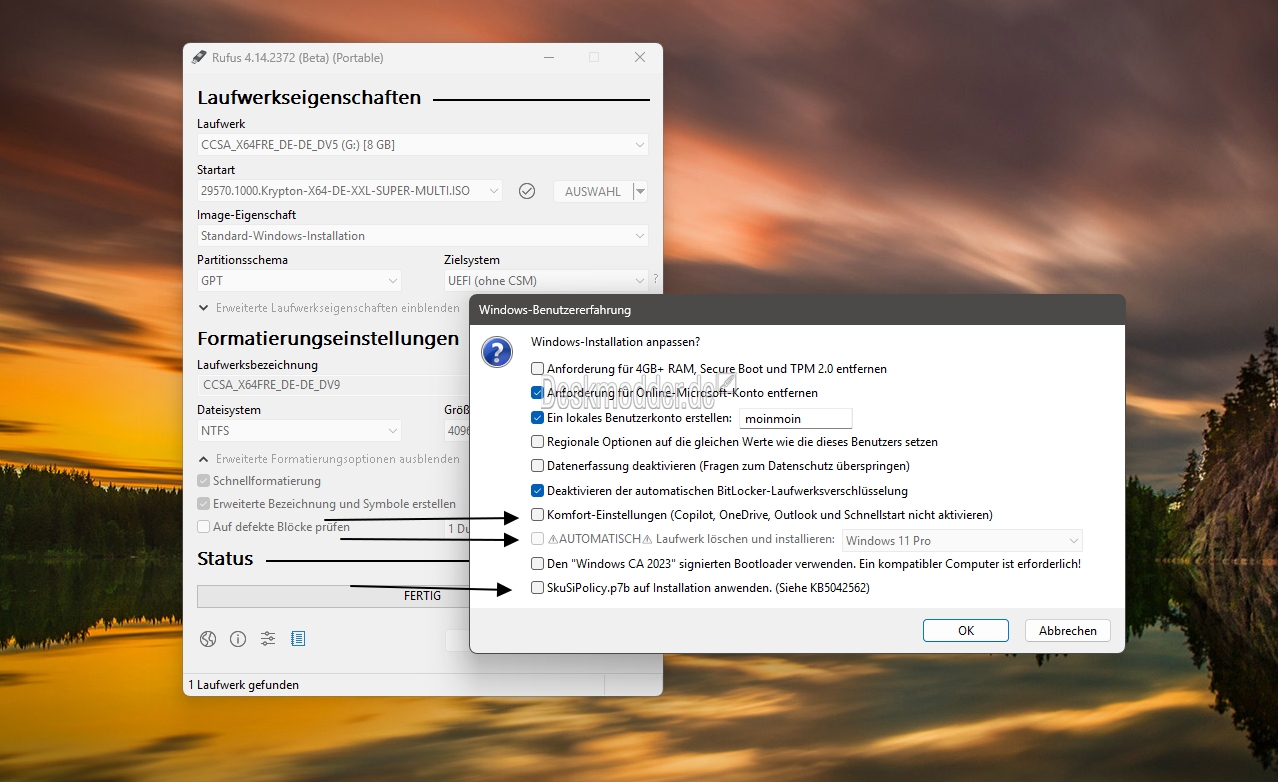
Rufus nennt das eine „Quality of Life“-Option“. Ab dieser Version, die derzeit noch Beta ist, ist auch die unbeaufsichtigte Installation von Windows ohne eine Abfrage möglich. Und auch die Option zum Kopieren der SkuSiPolicy.p7b in das ESP bei der Installation (KB5042562) wurde hinzugefügt. Weitere Änderungen sind:
- Tooltips für alle Dialogoptionen wurden hinzugefügt
- Begrenzte Unterstützung für die El-Torito-UEFI-Image-Extraktion wurde hinzugefügt. (Hauptsächlich für Dell-BIOS-Update-ISOs)
- Verbesserung der Fehlermeldung, wenn der Benutzer versucht, ein Image zu verwenden, das sich auf dem Ziellaufwerk befindet
- Verbesserung der UEFI:NTFS-Partitionsbezeichnung, um das Installationsmedium während der Festplattenpartitionierung im Windows-Setup deutlicher zu kennzeichnen
- Verbesserung der Unterstützung für Bazzite und andere Fedora-Derivate, die nicht den EFI-Konventionen folgen
- Verbesserung der Erkennung und des Ausschlusses der neuen versteckten Bitdefender-VHDs
- Korrektur potenzieller Fehler bei der Erstellung von Windows To Go-Medien aufgrund der Verwendung neuer Versionen von bcdboot
- Korrektur von Fehlern bei lokalen Konten, die mit Leerzeichen beginnen oder enden
Info und Download Rufus 4.14 Final:
Danke an alles für den Hinweis.
Windows 11 Tutorials und Hilfe
- In unserem Windows 11 Wiki findet ihr sehr viele hilfreiche Tipps und Tricks.
- Falls ihr Fragen habt, dann stellt diese ganz einfach bei uns im Forum.
- Installationsmedien: Aktuelle Windows 11 ISOs findet ihr hier: 25H2 26200. Ansonsten immer in der rechten Sidebar.
- Windows 11 neu clean installieren Tipps und Tricks.
- Windows 11 auch ohne TPM und Secure Boot installieren.
- Windows 11 mit lokalem Konto auch Offline installieren.
- Windows 11 Inplace Upgrade Reparatur oder Feature Update.
- Automatisch anmelden Pin entfernen Windows 11.
- Alle Beiträge zu Windows 11 im Blog findet ihr über diese Seite. Wobei auch alle anderen Artikel interessant sein können.
Rufus 4.14 (Final) hat eine Option zur unbeaufsichtigten Installation, die Entfernung von Apps und mehr



Mhhh meinen die die Schnellstartfunktion in der taskleiste oder von Windows?
gepostet mit der Deskmodder.de-App für iOS
Nein, das ist der Fast-Boot von Windows. Mit dieser Option wird Hiberboot deaktiviert (im englischen ist das besser ersichtlich, oder im Source Code von Rufus: https://github.com/pbatard/rufus/commit/8db609d0ef8eb7d42969a5803922d746007ea61e#diff-d3efeb8d0d8a3325b12f464feab14ff178996ecc5f116e9e51184e8f420569f4R380)
Danke für die Info
gepostet mit der Deskmodder.de-App für iOS
Das ist die Schnellstartfunktion von Windows. Die hat in der Vergangenheit immer wieder Probleme verursacht.
cool! Danke für die Info.
Danke für die Info
gepostet mit der Deskmodder.de-App für iOS
Hmm Schnellstart ne immer sofort deaktivert in win 11 in win 10
An Rufus bitte noch ReFS sichtbar machen im Partitionierer.
wenn das geht.
Das mit den harten abbrechen beim installieren und neustarten geht nicht und den cmd und steinzeit Partitionierer ist mag ich nicht, bin Profi mausschupser. ^^
Super, Danke für die info. Bloatware schon vorher auszusperren ist die Zukunft, das saubere entfernen und wiederherstellen der original Windows Gui wird immer aufwendiger. Mittlerweile selbst mit Hilfe von OO Shutup, Aero Tweaker, Deskmodder regedits etc. benötigt man schon bald 90% der Zeit beim Neuaufsetzen daran das System wieder schlank, sauber und betriebsbereit zu bekommen.
Hmm also mein System ist in 7 Sekunden gebootet, egal ob mit oder ohne die MS Sache, hab das mal getestet?
Und ich bin ja nicht doof also hab ich revo uninstaller pro besorgt 2 Jahre version und lösche 20 Apps in 1 mal, der macht das selbe ja, wie von Hand aber schneller.
Mit der Enterprise ist es ja nicht mehr so schlimm 3 Apps.
Onedrive lasse ich jetzt stehen das kommt sowiso bei jedem Update wider drauf
Wegen Aero Tweaker, also alles, anklicken wo willst den Export der Dateien, wenn System neu installierst einfach die Datei wider importieren und alles ist in einmal wide so wie du wolltest. sogar ohne system komplett neu zu installieren.
Sonst einmal Windows installieren und alles, anpassen was du willst und den vom C Grundsystem ein Image und wenn wider neu installieren, musst/willst kannst einfach das Image zurück speichern und bist fast am anfang aber alles schon eingestellt innerhalb 5 minuten.
Danke für die Info, ich wusste nicht das man da Profile erstellen kann.
I’ve used Rufus for several ISO images which were released as N-versions through this website, without entirely understanding what an N version software release is. In addition, I’ve also updated two USB sticks with those version releases through Rufus and its capabilities for quite some time now; only later did I learn that each release of Rufus could also be updated through the Microsoft App store on Windows.
I’ve yet to download the latest release according to the blog that Deskmodder has indicated is recent, right now, however, I do not know whether or not the Microsoft App Store will provide the latest release either. When I’ve updated each image along the way I have also checked the boxes for additional features to remove the additional security measures and encryption features that you can’t do without when downloading from Microsoft website before; this is where Rufus has become essential to any installation for an update.
Although I have yet to find the answers to some of my questions, including what these automated installations are combined into Windows automatically and optionally, but you have no option to exclude these additional features because they’re already included with the stand alone release, at least according to Microsoft. It’s ironic to me that Microsoft trusts this platform so skeptically, especially when they are combining bloatware by default, only to make a profit off of others and their developers.
As kind of an experienced consumer and individual who’d grown up with Windows, before everything becomes artificial and technology based, I believe that there might be a need to, you know, go back to more basic features which we probably will never do just because it’s a money making industry, and our government currently is taking advantage of that and the consumers only to make themselves look more reputable.
The question I really have is whether all this crapware that is included in the installation can be actually removed and our Rufus release program will still be supported and updated in the Microsoft App Store.
Please don’t ask for my opinion about whether AI and robotic based industries are actually legitimate anymore, or whether it’s an opportunity for opportunists to replace intelligence of our own. However, I also think it might be worthwhile to have the option and not have to download a separate uninstall program to get rid of these extra features, because the only way you could previously uninstall stuff like Copilot or Google AI or anything related to that would be through a separate uninstaller program.
Aside from my opinions and whether the controversial subject of AI is necessary, I believe that it might be worthwhile for Rufus to continue being supported in the Americas as well under the Microsoft app download platform, as well as trying to get rid of this extra crap where that we as consumers have to deal with unnecessarily. International competition and the fact that other countries besides the Americas are making far more progress and reputable advances for consumers might bug our government, but it also should be a clue as to how far behind we currently are in the market and any progress for employment as well as consumer competition and any sort of other development.
I look forward to seeing any sort of additional steps or progress in our own region before they decide to complain about how unfair the global market is in the near future. I doubt storage capacity is the real problem as far as making advances and high download bandwidth files anymore, because I know that corporations, small businesses and enterprises alike do their best to inflate and make costs as high as possible just to one up everybody else in the global market.
I find it personally ironic that everybody is worried about marking their territory like this:
Development and safety is the same thing or equals, and everybody is worried about who is the best developer between the pissing contest and consumerism overall. I’ll go one better by stating if we are as concerned as we believe we are, we would have been far more ahead of the curve than we are, worried about supporting our government and our nation and looking like the boss when we are clearly no better than anyone else. This is a real example of what artificial intelligence means if you really look deeply as to what the hell artificial and its definition truly meant to begin with, because we are right there right now.
Thank You,
GK
Nur einmal als Beispiel in Windows 10: Diese Funktionen fehlen in der N-Version
https://support.microsoft.com/en-us/topic/media-feature-pack-for-n-editions-of-windows-10-version-1607-b657cb70-33e7-1f11-7119-3b4b50be4e89
Die N-Version braucht aber auch einen anderen Key
hi,
betr. SkuSiPolicy.p7b
—
Probleme: Wenn die Richtlinie entfernt oder durch eine falsche Version ersetzt wird, kann das System nicht mehr starten (BlueScreen, Fehler 0xc0000428).
—
wie verhält sich das bei einem Firmware Update ?
Jim
Dieser Fehler tritt auf, wenn die SVN in der SkuSiPolicy.p7b niedriger ist als sie die entsprechende UEFI Variable fordert.
Tritt wohl auch nicht mit jedem UEFI auf. Eigentlich sollte der Boot Manager dann überhaupt nichts machen, damit ggf. das nächste Boot Medium in der Kette eine Chance bekommt.
Wer für diesen Bug wohl zuständig ist? Da dürfte Microsoft auf den UEFI Hersteller und umgekehrt mit dem Finger zeigen.
Immerhin kann man Hyper-V seit dem April Patchday ohne Blue Screen jetzt von einer ISO mit Boot Manager mit dem 2023 Zertifikat starten. Ging zuvor auch nicht. Da dürften noch mehr Überraschungen bis November auf uns zukommen.
SkuSiPolicy.p7b wird von Rufus nicht in das ESP installiert. Dann bootet kein anderes Medium bei aktiviertem SecureBoot mehr, das selbst keine SkuSiPolicy.p7b enthält.
Es wird deshalb aus der install.wim auf den Rufus USB-Stick kopiert, damit der dann auch weiterhin bootet.
Da MSFT aber mit jeder SVN auch in der SkuSiPolicy.p7b die Daumenschrauben weiter anzieht wird auch das ein Hase und Igel Spielchen, sollte man SkuSiPolicy.p7b in die ESP kopieren und damit scharf stellen.
Dass man am April Patchday von SVN 7.0 auf SVN 8.0 erhöht hat hielt man bei MSFT nicht der Rede wert irgendwem mitzuteilen, obwohl es erhebliche Nebenwirkungen haben kann, wenn man sein externes Recovery- bzw. Installermedium nicht mitaktualisiert und damit im Notfall ohne Abschalten von SecureBoot und dadurch erforderlichen aber blöderweise gerade nicht auffindbaren Bitlocker RecoveryKey nicht mehr zur Reparatur/Neuinstallation starten kann.
Merkwürdig, seit einiger Zeit bekomme ich mit Rufus keinen funktionierendes Windows 11 Boot Medium mehr hin.
Dabei muss ich sagen, dass ich noch Legacy Boot verwende und in Rufus auf MBR umgestellt habe.
Aber so funktioniert es halt leider nicht.
Ohne Rufus kann ich auf meinem System kein Windows 11 installieren, weil die Hardware zu alt ist und ich das TPM Modul aus „Sicherheitsgründen“ wieder aus dem System entfernt habe.
Hat jemand auf einem System mit Legacy Boot ähnliche Erfahrungen gemacht?
Hi ihr Fachleute, warum dauert eine Erstellung eins Windows To Go USB Sticks so lange. Nein ich habe keinen lahmen PC (Intel i9 mit Asus Board Maximus Z 790 Hero).
Und als der Stick nach über 2 Std ohne Fehlermeldung fertig war startet der Stick nicht mal.
Hat da jemand eine Meinung dazu?
Gruß Berti
Du kopierst nicht eine riesige sondern hunderttausende kleine Dateien. Das dauert nun mal ewig.
ist halt wie scsi eine 1 gb Datei ein paar Minuten 2000000 klein Dateien ne stunde ^^
ach ich habe einen SanDisk extreme pro mit SSD Technik 380mb schreiben 420 lesen
das rennt ^^
@Hat da jemand eine Meinung dazu?
Welcher Stick ist das genau?
Marke Bezeichnung Schreib-/ Leseraten
Viele günstige Standard-USB-Sticks haben trotz allem extrem geringe Schreibgeschwindigkeiten bei kleinen Dateien (4K), was die Installation massiv in die Länge zieht.
Rufus braucht über 15 Stunden, um einen Windows-to-Go- …
= dont worry be happy
Läuft nur auf USB 2.0 statt mit 3.0
USB 3.0/3.1/3.2 Stick
Cache vom Stick zwecks „Schnellem Entfernen“ im GMgr ändern
Defender aus und Energieeinstellungen auf Max
startet der Stick nicht mal – Bootfähigkeit?
F12 zum direkten Auswählen des Sticks
Kann man sich ja mal testen.
thanks👏🏻👏🏻👏🏻👏🏻👏🏻
Guten Sontag allen
Ist es möglich mit Rufus eine ISO zu erstellen ?
Ich brauche eine ISO Für DVD für alte Rechner.
Danke
Wenn du die Update-Funktion aktiviert hast, kannst du eine aktuelle ISO von Microsoft direkt herunterladen und Rufus, kopiert sie gleich auf einen Stick.
Stick nutzt Dir wahrscheinlich nicht viel bzw. nichts, wie ich Deiner Frage entnehme … Direkt-Erstellung hab ich probiert – ist mir nicht gelungen. Aber – hintenrum klappt’s:
Lade Dir eine ISO runter (oder erstelle sie Dir selbst). Dann rufst Du RUFUS auf und erstellst Dir damit einen Stick. Den läßt Du im Rechner, lädst die zuvor runtergeladene ISO in PowerIso, kapierst alle Dateien vom Stick da rein (Überschreiben -> alle) und speicherst die neu erstellte ISO unter neuem Namen ab — oder schreibst die auf DVD (Größe beachten – DVD-DL reicht im Allgemeinen für Windows 11 nicht mehr aus)!
Also: „Abspecken“ oder BD benutzen, falls passender BD-Brenner vorhanden …